Events remain one of the most effective ways for financial services firms to build trust, showcase expertise, and strengthen client relationships. Whether it’s a market outlook webinar, client seminar, or industry conference, these moments of connection carry real weight in a relationship-driven, highly regulated industry.
But traditional event management often relies on manual, disconnected processes that create inefficiencies and limit ROI. Today’s marketing teams need a more integrated approach. Your event strategy should connect seamlessly with your CRM, automate key workflows, track engagement across touchpoints, and deliver clear, actionable insights.
That’s where HubSpot comes in. When implemented effectively, it transforms event execution from a manual lift into a streamlined, data-driven channel—one that drives qualified leads, supports compliance, and strengthens long-term client relationships.
Setting Up Your HubSpot Events Framework
Successful event management in HubSpot starts with strong upfront configuration. Your event setup should act as a single source of truth that connects registration, workflows, and reporting into one cohesive system.
Begin by creating a dedicated event record in HubSpot that captures key details:
-
Date
-
Time
-
Format (in-person, virtual, or hybrid)
-
Location or webinar platform
-
Capacity limits
-
Any associated costs or registration requirements
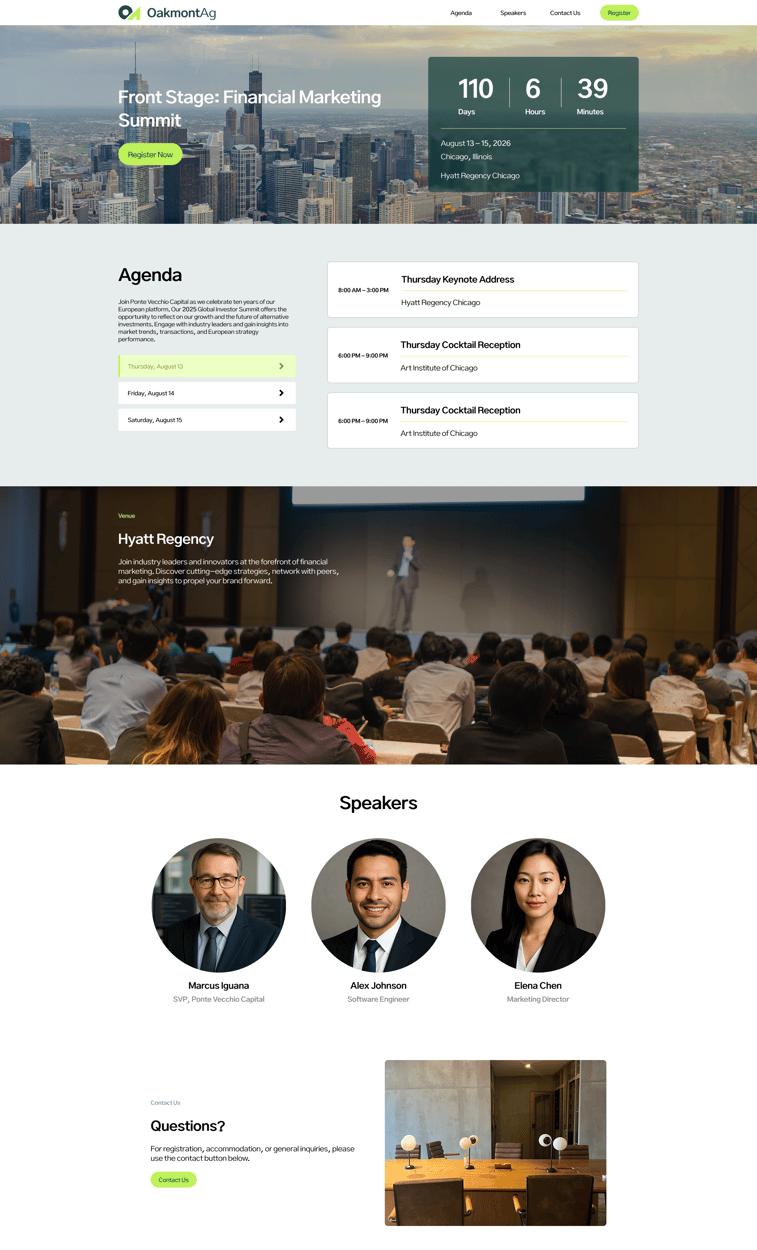
Your event landing page is your primary conversion point, so it needs to balance user experience with compliance. Build pages using HubSpot’s drag-and-drop editor or custom modules that align with your brand and remain fully mobile responsive.
To drive registrations, include:
For financial services firms, it’s also critical to incorporate required disclosures, privacy links, and consent language to meet regulatory standards. Your forms should capture essential attendee data—name, email, company, role, and any qualifiers that support segmentation and lead scoring.
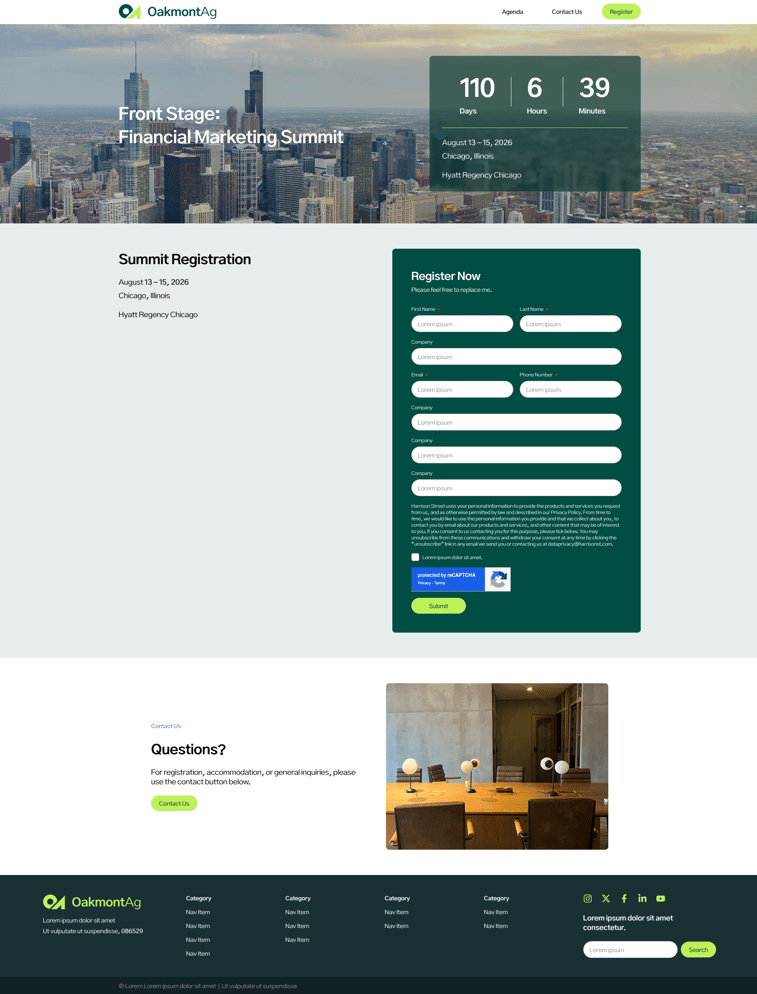
Use a dedicated registration page with HubSpot forms to feed data directly into your CRM. Form submissions should automatically create or update contact records, associate registrants with the correct event, and trigger your workflow automation.
Finally, if you’re managing multiple event types (e.g. client webinars, prospect seminars, industry conferences) establish clear naming conventions and reusable templates. This ensures consistency, speeds up execution, and maintains clean, reliable data across all event marketing efforts.
Automating Registration Workflows and Communications
HubSpot workflows elevate event communications from manual tasks to automated, behavior-driven engagement. Start with a registration-triggered workflow that sends an immediate confirmation email with key details, including calendar links, access information, and any prep materials. This first touchpoint should reinforce the value of attending and set clear expectations from the start.
From there, build a streamlined workflow that supports the full attendee journey:
- Pre-event reminders: Schedule emails (one week, a few days, and day-of) to boost attendance and reduce no-shows
- Personalization & segmentation: Tailor messaging using contact data (e.g., clients vs. prospects, service tiers, or interests)
- Conditional logic: Adjust communication paths based on engagement or audience type to keep content relevant
- Lead scoring: Increase scores based on registrations, email engagement, and attendance to prioritize follow-up
- Ongoing nurture: Share speaker highlights, agenda previews, or relevant insights to maintain interest leading up to the event
Together, these workflows keep attendees engaged from registration through event day—while giving your team better data to drive meaningful post-event follow-up.
Tracking Engagement and Measuring Event ROI
Effective event management depends on a tracking infrastructure that captures engagement across the full event lifecycle. In HubSpot, that starts with clean data and seamless integrations.
Set up custom properties to track key attendee actions, including registration date, attendance status, engagement level, session participation, and post-event activity. For virtual events, connect platforms like Zoom, GoToWebinar, or ON24 to automatically sync attendance, watch time, and interaction data directly into contact records. This eliminates manual work while giving you a complete view of each attendee.
From there, build a reporting framework that ties engagement to outcomes:
- Performance dashboards: Track registration rates, attendance, and overall engagement
- Funnel reporting: Measure the full journey from landing page visit to post-event conversion
- Revenue attribution: Connect event participation to business outcomes like new accounts, AUM growth, or product adoption
- Campaign tracking: Group all event assets under one campaign to understand true ROI
- Source insights: Use UTM parameters to identify which channels drive the highest-quality registrations
- Benchmarking: Compare performance across events to refine topics, formats, and speaker strategies
Together, this approach turns event data into actionable insight, helping you optimize performance, prove ROI, and continuously improve your event strategy.
Post-Event Nurturing and CRM Integration Best Practices
The post-event window is where engagement turns into opportunity. To capitalize on that momentum, build workflows that segment attendees based on participation (e.g. attended vs. no-show, highly engaged vs. passive, clients vs. prospects) then tailor follow-up accordingly.
Your post-event strategy should include:
- Targeted follow-up: Send attendees recordings, materials, and next steps aligned to their stage in the buyer’s journey
- No-show recovery: Share key takeaways and on-demand content while offering new ways to engage
- Sales alignment: Flag high-value participants and notify relationship managers for timely, personalized outreach
- Lead scoring: Increase scores based on meaningful engagement like Q&A participation, downloads, or full-session attendance
- Ongoing nurture: Enroll attendees in relevant content streams, future event invites, or exclusive opportunities
- Feedback collection: Gather insights on content, speakers, and experience to inform future events and segmentation
By connecting event engagement directly to your CRM and follow-up strategy, you turn one-time interactions into long-term relationships while building a clearer picture of what drives meaningful results.
Ready to make your event strategy work harder? With the right HubSpot setup, your events can do more than inform—they can drive measurable pipeline and lasting client value. Contact us today to get started.
You might also be interested in:






.svg) Contact Us
Contact Us
.jpg)