


How HubSpot Help Desk Reduced Our Median Close Time
Support systems usually don’t become a problem all at once. The friction builds gradually as teams scale.
As a managed services organization scaling support operations, we need systems that reduce management overhead while improving accountability and visibility. So, when HubSpot signaled that Help Desk was becoming the future of Service Hub, we decided to explore it seriously.
The legacy ticketing setup did its job, but it required more management involvement than it needed to. No proactive SLA notifications meant someone always had to manually catch aging tickets before they breached. And reporting had the same limitation: we could pull numbers, but not with the specificity to understand where things were slowing down or how workload was distributed.
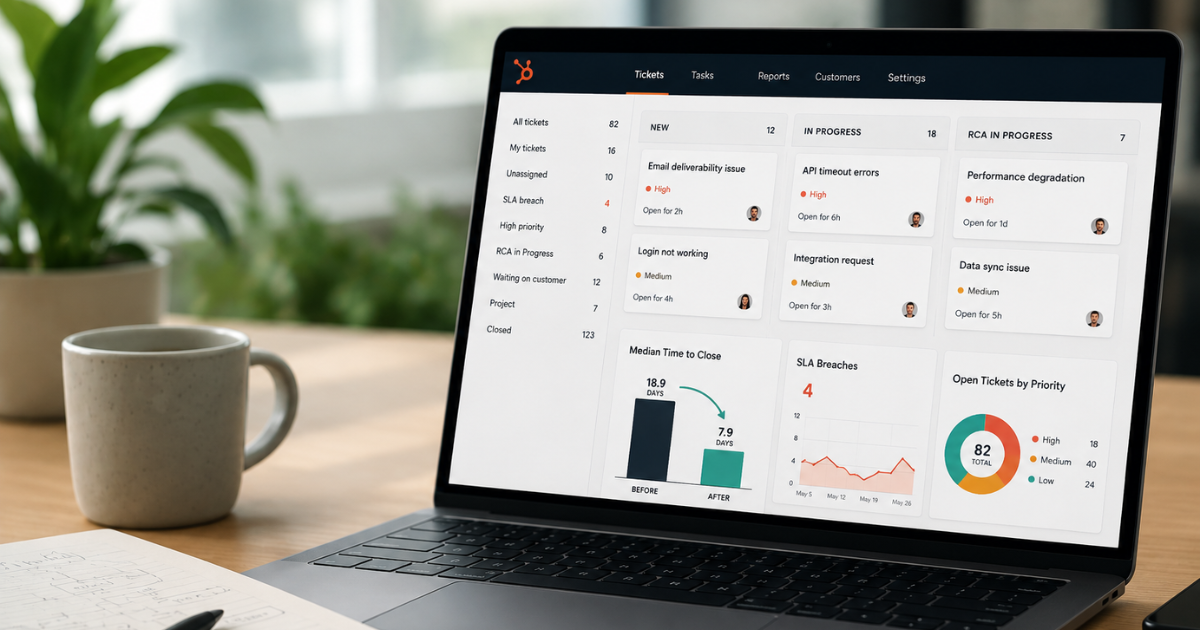
Median Time to Close Dropped by 11 Days
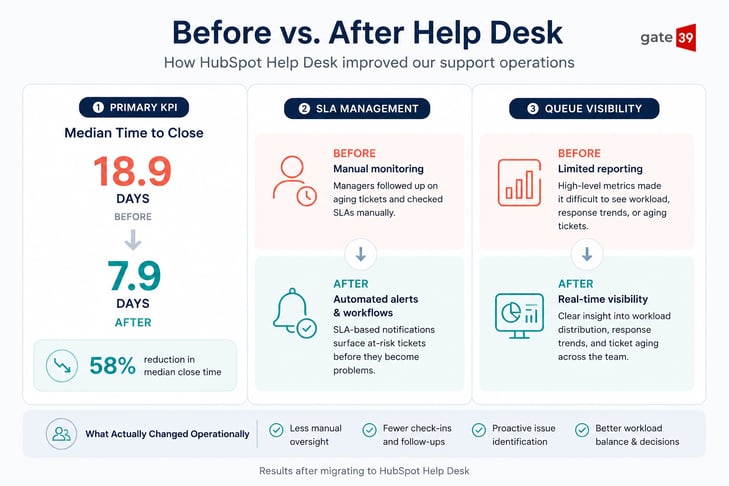
The most immediate difference was in how SLA management worked. Instead of relying on managers to catch aging tickets manually, Help Desk surfaces them proactively through SLA-based notifications, queue visibility, and workflows before they become a problem. That one change alone reduced escalation chasing and manual SLA follow-up.
The reporting improvements became more valuable over time as we gained visibility into workload distribution, response trends, and ticket aging. We now have a clearer understanding of how work moves across the team and where bottlenecks are forming.
The number that tells the clearest story: our median time to close dropped from 18.9 days to 7.9 days after the migration.
We also trimmed our initial response time by 6.9%, from 11m 30s to 10m 42s. Not a dramatic shift, but a sign the automated notifications were doing their job.
Download Our Definitive Guide to HubSpot For Service »
What We Set Up
Help Desk gives you a lot to configure, so those decisions matter as much as the migration itself.
We organized our views around ownership, collaboration state, and ticket status. Adding stages like “RCA in Progress” and “Project” helped the board track where work moved after the initial fix, not just who was handling it in the moment. This matters especially for a managed services team handling ongoing client relationships.
We also mapped our internal priority tiers directly to HubSpot's native priority field from day one. Our SLA matrix has its own structure, and rather than choose between our model and HubSpot's, we bridged them. That kept our logic intact while still getting the full benefit of HubSpot's filtering and reporting.
Help Desk also allowed us to reduce several custom workflows that required constant maintenance and were prone to errors over time. Replacing those workarounds with native functionality reduced overhead and made the system easier to manage long term.
The Transition Wasn't Perfect (At First)
Even with a solid configuration, the rollout had its rough edges. Old habits meant some people kept drifting back to the legacy ticket view and that surfaced a real problem: notes left in the legacy view didn't appear in Help Desk, and comments in Help Desk didn't show up in the old view. For a team running both in parallel, it meant duplicated communication and gaps that were easy to miss.
HubSpot has since resolved the sync issue, but it took a few months to get there. The broader lesson, really, is that any friction points you identify during a migration are worth flagging to your HubSpot rep directly rather than just working around them.
Before and After: How Our Support Operations Changed
Should You Make the Switch?
If your support volume is low and your current setup isn't creating friction, the legacy ticketing tools may still be enough for now. But HubSpot has made it clear that Help Desk is where new Service Hub development is happening, and the legacy experience will eventually be deprecated.
Migrating sooner gives teams time to adapt before the transition becomes mandatory and keeps you aligned with new functionality as it’s released.
If you're evaluating Help Desk or planning a migration, Gate 39 can help you:
- Walk through your process and identify where Help Desk can streamline workflows
- Set up the configuration top to bottom and migrate old data from HubSpot or another system like Zendesk or FreshDesk
- Build reporting dashboards for teams that need visibility beyond the default Help Desk analytics
- Train your team and provide documentation to simplify onboarding for new reps
As a HubSpot Platinum Partner, we help teams build Service Hub processes that scale with their support operations. Let's see where Help Desk can reduce manual work in your support processes. Talk to our team to get started.
You might also be interested in:
Imagine this: someone on your team uses HubSpot's Breeze AI to generate a few blog drafts, build a workflow, and ask, "If the tool can do this much,...


Connect with us to discover how we can help your business grow.
.svg) Contact Us
Contact Us
.jpg)